
About this newsletter
This is the XGEN and AI newsletter published fortnightly by Plateer AI Labs. The issue that goes out by email is readable here on the web, as it is.
As more work runs through AI agents, managing those agents and the tools they connect to matters more. This issue covers XGEN's November update for that job.
For an AI agent to move beyond answering questions and actually do work, it has to connect to tools such as mail, documents, and internal systems. MCP (Model Context Protocol) is the standard protocol for that connection. The more agents and tools are connected, the more an operator has to keep track of: which agent uses which tool, who uses how much, and what work stops if a given server is taken down. Microsoft also added MCP server management to its agent management product at Ignite on November 17.
In the November update, XGEN rebuilt MCP management as two screens, [MCP Server Management] and [MCP Catalog Management]. Every MCP call is logged in one place, so usage and errors can be reviewed, and each user can connect to the same MCP server with their own account. This went to the validation environment on November 18 and is planned for the next production release.
Before that, the November 12 production release included the features introduced in the validation environment in October, along with the three security fixes listed as open items in the last issue. This issue also covers record memory, which lets users see and correct what an agent remembers, and the manual updater, which refreshes the manual when a screen changes.
Release
XGEN in November
main marks the November 12 production release, stage marks features in the validation environment as of November 18, and dev marks features running in the development environment.
MCP server management · See who uses which tool, from which agent, and how often
Call log and dashboard. MCP calls that pass through the XGEN server are logged at a single point. Each call records the user, agent, tool, success or failure, and where it was called from, and the log can be searched or exported to Excel for 90 days. The dashboard shows call volume, error rate, response time, and the most-used tools and agents.
Arguments passed to tools, their results, and personal variable values are not stored. If writing the log fails, the call still goes through.
Usage check. Before changing or taking down a server, [Usage] shows which agents use it and their deployment status.
Shared and personal variables. Values everyone shares go into shared variables; values that differ per person (for example, each person's Google account) go into personal variables. The same server can then run under each user's own account without changing the MCP server code.
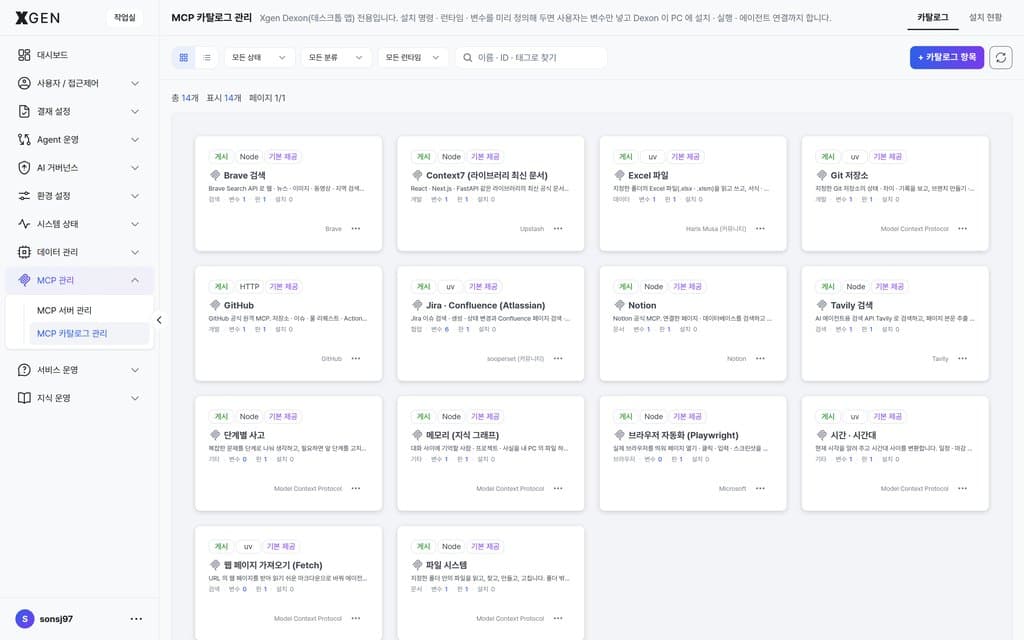
MCP catalog. MCP servers installed on a user's PC are handled by the DexOn desktop app. Once an administrator defines the install method in the catalog, users only enter their variables. Fourteen entries, including GitHub, Notion, and Jira·Confluence, ship by default with pinned versions.
This is in the validation environment (stage) and is planned for the next production release.
Security follow-up · Last issue's three open items are now in production
The three items we described as in progress after the ARTEX review are included in the November 12 production release.
Guest account abuse. Guest sign-ups and daily token usage now have limits.
Calls only from allowed origins. The CORS setting that allowed every origin now uses an allow list.
Refresh token reuse detection. A refresh token that has already been used is detected if it comes back. It is off by default and can be turned on to suit the customer environment.
Re-verification after these fixes continues, and we will share the results in the next issue.
Raw logs · Stored encrypted, opened only with a stated reason
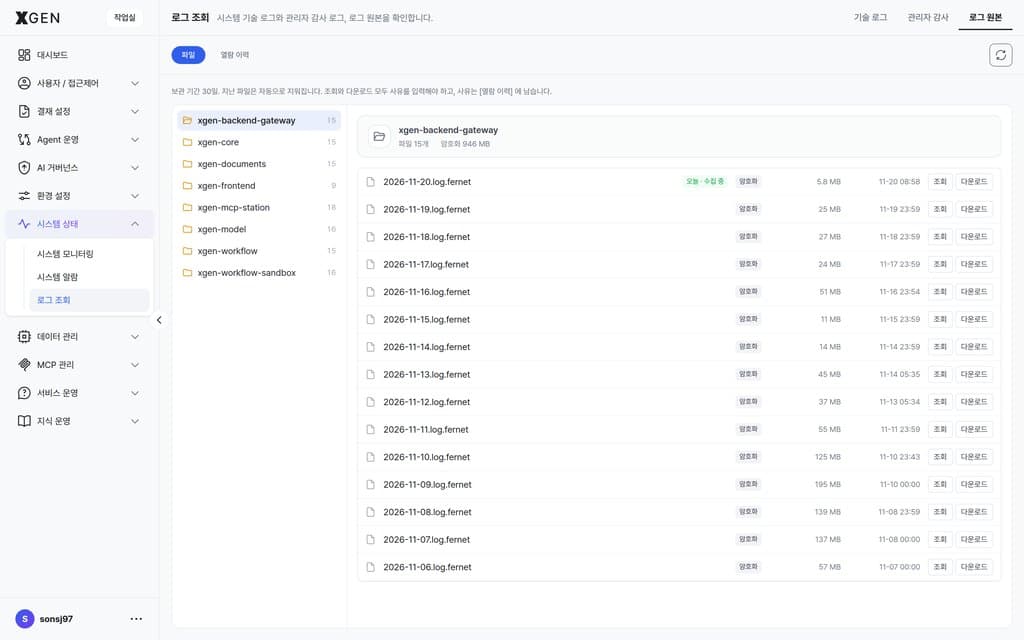
Raw logs for each service are encrypted and kept for 30 days. Viewing or downloading them requires a reason, and the reason and access are recorded in [Access History]. When investigating an outage or security incident, you can see who opened the raw logs and why. Downloaded files cannot be tracked after download, so we recommend granting download rights only to administrators who need them.
Agent resource management · A storage limit for each agent
Workspace and sandbox disk usage is shown per agent, with limits applied. The sandbox defaults to 20 GiB with a maximum of 60 GiB; more than that is requested through approval. Administrators can see agents close to their limit and long-unused space on one screen.
Record memory · See and correct what an agent remembers
What an agent learns in conversation is recorded as rules, facts, states, decisions, and procedures. Users can view and edit these records in the [Memory] tab, and each edit keeps a version so the previous state can be restored. We built this on the view that work can only be handed to an agent if people can check what it remembers.
Sub-agents · Use an agent you built inside another agent
Agent Geny can create agents under the user's account and call existing agents as sub-agents. For example, you can set up a parent agent that calls a 'research' agent and then a 'report writing' agent in order. Geny can create up to 20 agents per user per day.
Manual updater · When a screen changes, the manual follows
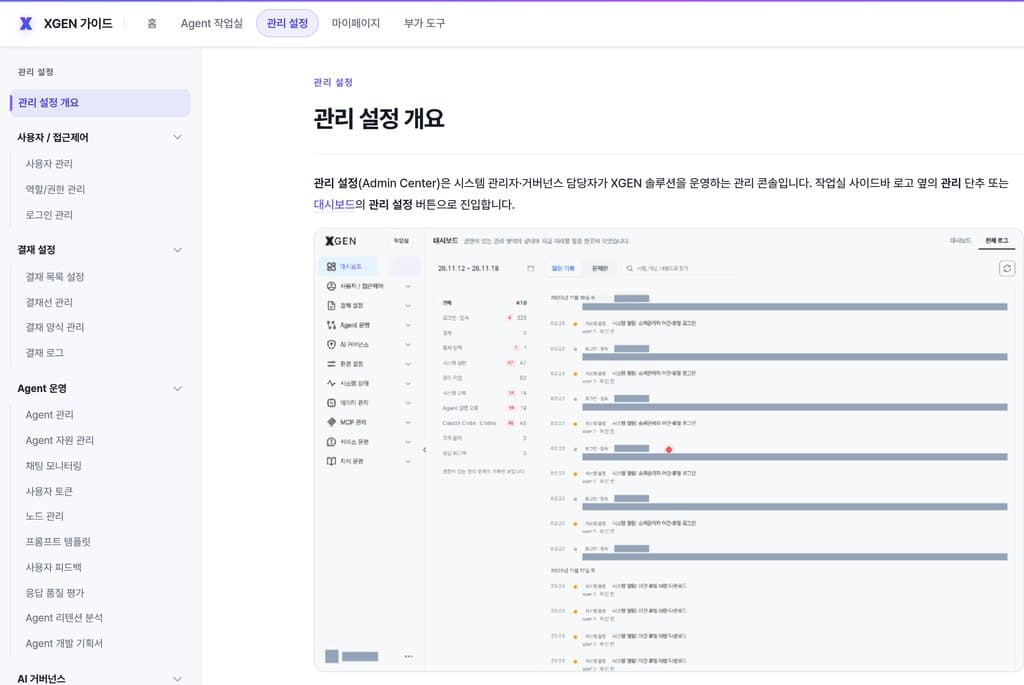
Each of XGEN's 85 screens has a 'screen contract' file listing its buttons, input fields, and display conditions. Since November 17, the manual updater checks changed contracts daily, re-captures the screens in affected chapters, and rewrites only the sentences that need to change. Names and contact details in captures are masked before they are applied. From November 16 to 19 it revised 38 chapters and took 438 new images; it is currently applied to the development environment manual.
Also in this issue
- New · [Queue] during a run — Messages sent while an agent is answering can be applied right away with [Add now] or put in the [Queue] to be handled in order after the answer. (stage)
- Improved · Voice activity detection — Silero VAD picks out only the stretches with speech for transcription, reducing misrecognition in silent parts of long recordings. (stage)
- Improved · Evaluation forms — Response quality evaluation forms are built by dragging data fields and formulas, with a preview before approval. (stage)
- New · Sample data for trial zones — New trial zones come with a fictional company's documents, 6 API tools, and 5 agents, ready to try. (main)
- New · LLM key per workflow — Each workflow can use its own LLM API key, laying the groundwork for splitting costs by workflow. Off by default. (main)
Numbers
MCP server management in numbers
90 days
MCP call log retention
Per user
Runs with personal variables
14
Default MCP catalog entries
MCP server management is in the validation environment (stage) as of November 18 and is planned for the next production release.
See all release notesScreens
Internal services built on XGEN
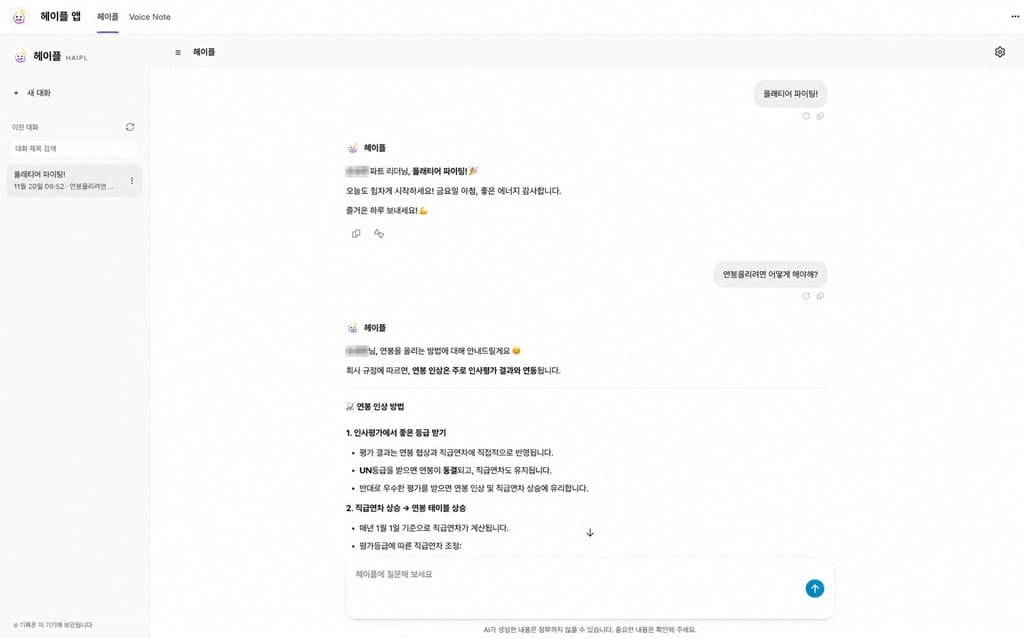
Heyple is Plateer's internal AI assistant, built by connecting XGEN agents to Teams. It moved to production on November 4. Voice Note turns a meeting recording or an uploaded audio file into a transcript and AI notes, which can be saved as a Word file to OneDrive or SharePoint or sent as a mail draft.
In progress
In development and research
Work we are refining through development and experiments. If a topic interests you, tell us any time.
DevStudio · Deploy and run apps built through conversation
60%This deploys and runs apps built through conversation on the XGEN server. In November we added HTTPS certificates, blue-green deployment, and automatic rollback to the previous version if a new version stops within 30 seconds. Deployment goes through approval first.
Geny · Quality validation before general availability
90%Geny's main features are deployed to production and are being validated for quality in real use. Once validation is complete, we plan to enable it in production.
Tool permissions · Splitting available tools by role
20%This splits the tools an agent can use according to the user's role. The design principles are that company databases are reached only through designated nodes, and code running in the sandbox has no network access.
Ontlas · Industry ontology adapters
30%Ontology research that maps business data to standard concepts for each industry. For finance, we are building an adapter based on FIBO, the standard financial ontology.
News
Technology news
Industry news we watched over the past two weeks, and what it means for us.
Microsoft · Agent 365 now manages MCP servers too
At Ignite on November 17, Microsoft announced that MCP servers now appear in the Agent 365 admin view, and that before a server is blocked, the agents and plugins that use it are shown first. Detection of local agents and MCP servers on employee PCs was also released in preview.
Showing the impact first is the same approach as [Usage] in XGEN's MCP server management.
Microsoft Tech Community · 3min
GitHub · Agentic workflows for repository upkeep are generally available
GitHub made Agentic Workflows generally available on October 28. Agents run repository maintenance tasks written in Markdown on a schedule in GitHub Actions; by default they have read-only access and run in an isolated environment.
Read-only by default, with writes allowed only through set paths, is the same direction as the tool permissions XGEN is designing.
GitHub · 2min
Google · An agent that keeps improving a shipped product
Google Labs released Stitch Loop on November 18. An agent connected to service metrics finds improvements, opens PRs, and gets human approval, in a repeating cycle. It is still experimental.
Human approval with records kept in the repository is the same structure as this issue's manual updater.
Google · 3min
Reading
Reading
Mintlify · How self-updating docs are built
On October 30, the developer docs service Mintlify published the architecture of its automatic doc updates. Once a day an agent finds what needs fixing and opens a docs PR, and memory is stored in git in a fixed format. Mintlify says its PR acceptance rate rose from 70% to 90%, by its own measurement.
This is almost the same structure as this issue's manual updater.
Mintlify · 7min
Anthropic · What agent memory is made of
On November 6, Anthropic published a piece on the components of agent memory. Rather than piling up work logs, it proposes 'dreaming': rereading the logs during idle time and organizing them into notes and wikis.
The conclusion is that organizing and correcting memory matters more than accumulating it, which is the same reason XGEN record memory lets people edit and roll back records.
Anthropic · 13min
The Claude Code team · Give the agent a way to verify first
On November 16, the Claude Code team described how they verify results in an environment where Claude writes most of the code. They set up tests first so the agent can check its own results, and have it call a person after failing the same check three times.
The manual updater runs quality checks before anything is applied automatically for the same reason.
claude.dev · 10min
Papers
Papers
November research on the same problem as this issue's manual updater.
Coming up
November content and XGEN channels
Content that may help when using or evaluating XGEN.
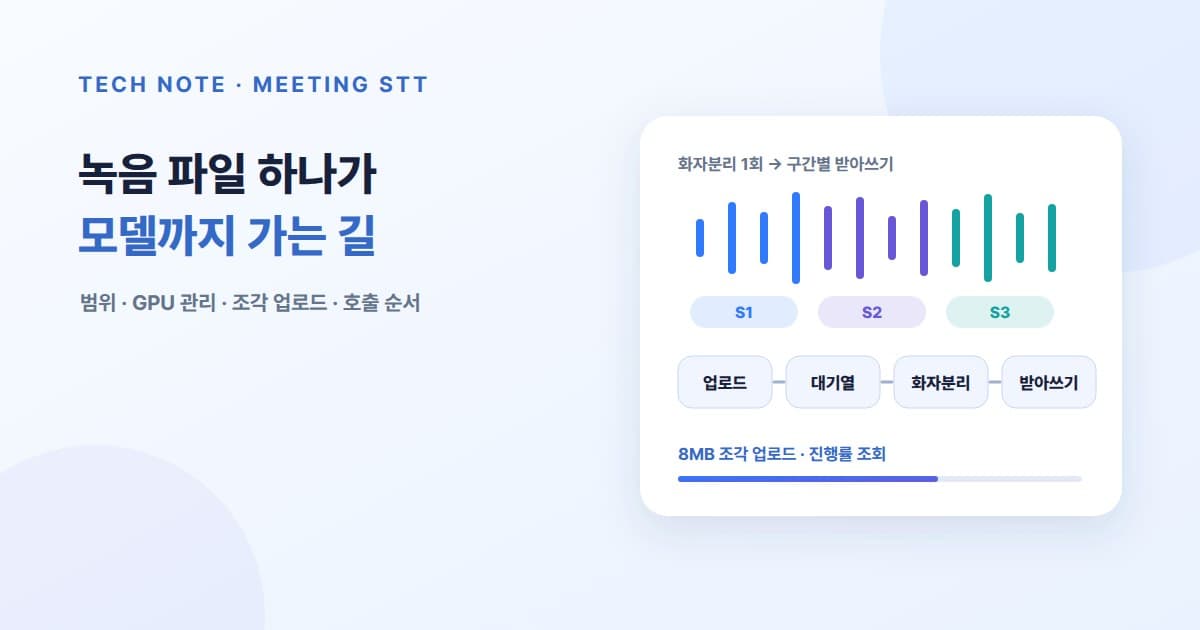
Our decisions changed four times while designing meeting STT and speaker diarization
The researcher behind last issue's 'meeting notes by speaker' feature wrote up the design process: where to run the diarization model, how to upload large recordings, and how those decisions changed. It may help teams evaluating air-gapped or self-hosted environments.
Plateer AI Labs on YouTube
Building an app by voice · Coding with DexOn (1:53)
After the app was described to DexOn by voice, an AI agent planned the work, built the backend and screens, ran and fixed it, and completed a 'real-time order monitoring' app.
From a single request to a finished app took 8 minutes 39 seconds.

Past issues are available in the Plateer AI Labs archive.
How was this issue?
If there is a topic you would like covered, or something that fell short, tell us. Your view shapes the next issue.
Send feedback