
Suppose you ask a generative AI to "analyze this Excel file and write it up as a report."
The AI can propose an excellent approach and a solid outline.
But in real work, everything after that is still yours to do.
Find and upload the file, download the result, open Excel or PowerPoint to revise it, search the browser for anything missing, and save the finished file to a working folder.
The reason is simple: the environment the AI runs in and the environment people actually do their work in are separate.
Dex is being built to close that gap.
This is a follow-up to Dex — the execution layer that reaches user devices. Where that piece covered why enterprise AI has to reach work devices at all, this one covers the installable touchpoint that implements it on PCs, phones, and tablets.
What is Dex?
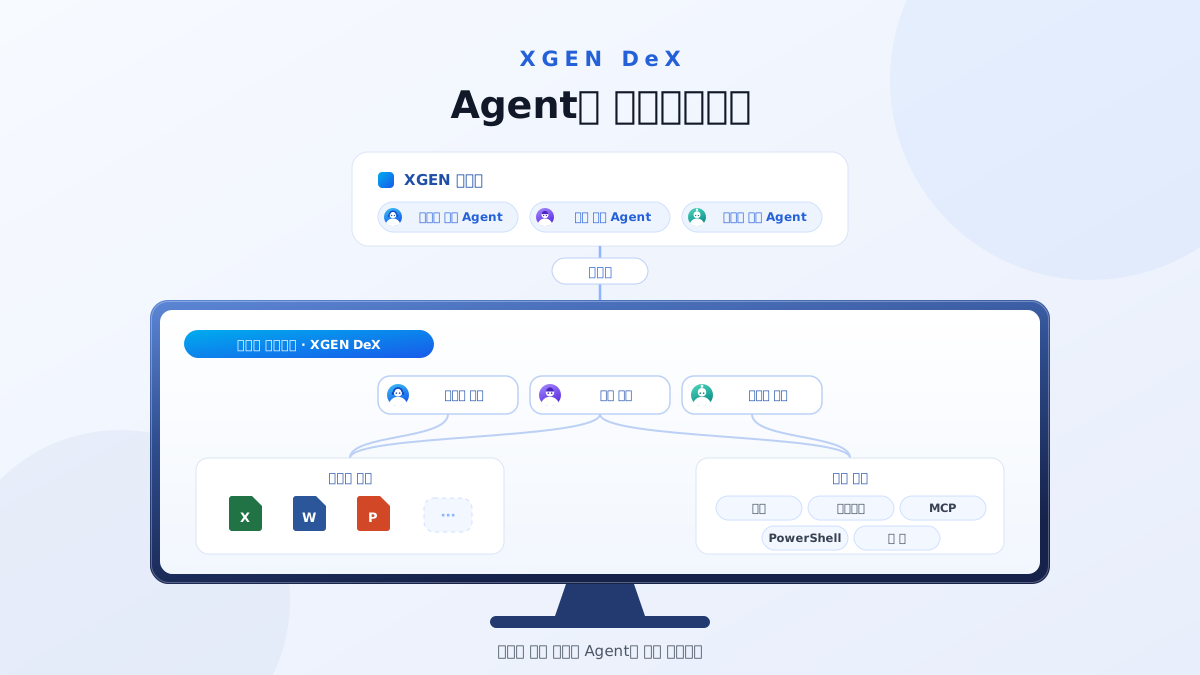
Dex is a device interface installed on PCs, phones, and tablets that connects the AI agents created and managed in XGEN with the user's actual working environment.
If XGEN is where you build and manage agents for work, Dex is what lets those agents carry that work out on the user's PC, phone, or tablet.
Its purpose differs from an app that simply makes XGEN chat available on a device.
Through Dex, an agent can use local files and applications within a permitted scope, use the browser, and run the tools and skills it needs to produce an actual result.
Put simply:
XGEN is where agents are built and managed.
Dex is where those agents connect to the user's environment so the work can actually happen.
The product is named Dex (Device Extension), and what it does is act as the execution interface between agents on the server and the user's local working environment. That is why xgen-connector still appears in the installer and repository names.
Why is Dex needed?
Enterprise work does not end inside a single chat window.
People move across many environments to get something done.
File → Excel → browser → internal system → PowerPoint → working folder
For AI to take over real work, it has to reach into those environments.
So the way of working that Dex aims at goes a step beyond
question → answer
to
request → choose the tools → execute → produce the deliverable
Rather than stopping at "analyze last month's data," you can ask:
"Check last month's results file, analyze the significant changes, and produce a result file."
That is, you ask for a unit of work that ends in a deliverable.
How do you use it?
Dex aims to be simpler to use than most AI tools for work, not more complex.
The overall flow is six steps.
| Step | What happens |
|---|---|
| 1 | Install Dex |
| 2 | Connect to XGEN |
| 3 | Pick the agent for the task |
| 4 | Connect the execution permissions it needs |
| 5 | Ask in plain language |
| 6 | Check the result and keep going |
The install screens and the detail of each step live in the hands-on companion.
→ Dex from install to first task — six steps
Here we will look only at why each step is designed the way it is.
Why agents are separated
Not every task is handed to one general-purpose AI agent.
Work in a company uses different data, different tools, and needs different permissions from one task to the next. So agents are configured in XGEN for each purpose, and in Dex you select the one that fits the situation.
A support agent, a data analysis agent, a document agent, a development agent, a team-specific agent — all available from one Dex, chosen as needed.
Why the execution environment is connected
For an agent to do real work on a user's device, it has to reach the execution environment the task requires. On a PC that can include local file and storage, browser, PowerShell, MCP, skill, or application. On phones and tablets, it connects the file, browser, and app capabilities permitted by the operating system.
Dex does not open all of these by default. This is the point where an agent managed on the web extends into the user's real working environment, so it is built to connect only the execution environments a task actually needs.
Why Workspace matters
What an agent produces becomes the start of the next task.
"From that result, pull out only the items that changed most against the previous month."
XGEN treats an agent not as a single LLM call but as a unit of work combining LLM + memory + workspace + tools + execution environment. Carrying a file and its working context into the next request is what makes continuous work possible, and that is what Workspace is for.
Which work should you start with?
Dex does not need to be applied everywhere.
The most effective starting point is work where a person repeatedly moves between several programs and files.
| Existing work | With Dex |
|---|---|
| Cleaning up Excel data | Check the file → analyze → produce a result file |
| Recurring reporting | Gather sources → analyze → produce the report |
| Post-meeting follow-up | Organize notes → produce minutes → list follow-ups |
| Document review | Read several files → compare → write up the differences |
| Web research | Search → check sources → write up the findings |
| Repetitive file handling | Scan a folder → act per file → save to a target location |
| Development work | Repetitive tasks using the local environment and tools |
| Internal agents | Pick the agent for the job → run it in the local environment |
A simple test helps when choosing what to try first.
"To do this work, does someone open, copy, search, and move files between programs several times a day?"
If so, it is worth trying Dex there.
It is not trying to replace your existing systems
One principle matters here.
Dex is not rebuilding Excel, PowerPoint, the browser, or SharePoint.
Companies already have systems, SaaS, and applications that work well.
Dex's role is not to replace them but to let an agent use those existing tools more easily.
It is less about adding one more tool and more about adding execution ability to the environment that already exists.
Server and local resources, together
For enterprise agents, running everything on the server is not always the efficient choice.
Work that touches files or applications on a PC, phone, or tablet naturally belongs in that device's execution environment.
Shared company data, centrally managed AI models, and agent assets, on the other hand, belong on the server.
Dex is built around that split: it connects agent resources on the server with execution environments on PCs, phones, and tablets. The same agent operates within the capabilities and permissions allowed on each device.
That way a company can manage agents and key assets centrally while connecting the execution that genuinely has to happen locally.
On a PC, the agent works alongside you on the desktop
Work tools need a window opened before you can use them. Find the app, launch it, open a chat, and only then say what you want. Those few steps are what send people back to "I'll just do it myself."
On a PC, Dex can put the agent on screen as a floating avatar. Upload a photo or a Live2D/Spine model to give it a look, set its size and position, and it stays there even when you minimize the window. Phones and tablets provide access to the same agent through interactions suited to their screens.

Turn the avatar on and the agent works alongside you on the desktop
You do not have to make one. The Store already carries ready-made characters to download and use as they are — and keeping a shared set there lets each agent wear a different face.

Pick a character from the store and download it
The avatar is not a visual flourish. It makes the agent something beside you rather than something you go and open. It is also the simplest way to show, on screen, that an agent managed on the server is actually there in the user's working environment.
An enterprise connector needs control alongside it
Once AI can reach PCs, phones, tablets, and enterprise data, one thing has to be considered with it.
Security and governance.
Who can use which agent, which data an agent can reach, which tools it can run, whether its actions are recorded, and how an attempt to reach sensitive information is detected and controlled.
In finance, the public sector, and large enterprises especially, that control matters as much as the convenience.
So the direction Dex takes is not
"hand my device to the AI."
It is closer to
"connect an enterprise-managed agent to a permitted working environment and toolset."
That is why Dex has to grow together with XGEN's agent management and AI governance.
In development. The security and governance controls described in this section are the direction Dex is heading, and they are still being built. We will share scope and timing as they land.
From asking AI questions to handing it work
Enterprise generative AI has mostly been used as people asking and AI answering.
Agentic AI needs one more step.
Beyond generating an answer, it has to use the tools it needs and produce an actual result.
Dex closes that last gap between XGEN's agents and the real working environment.
Build an agent in XGEN → connect enterprise data and systems → provide the tools and skills it needs → execute it in the real working environment through Dex.
Enterprise AI moves from
Ask → Answer
to
Request → Understand → Execute → Deliver
What Dex sets out to build is not another AI chat program.
The execution touchpoint that connects an enterprise's AI agents to the environment where work actually happens.
That is why Dex exists.
Read next
- Dex — the execution layer that reaches user devices — the first in the series: central control stays put, and nobody changes how they work
- Dex from install to first task — install, build, connect, and hand it work